
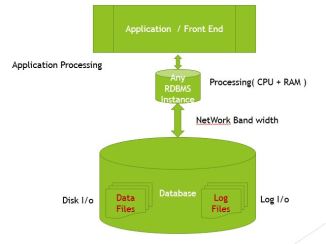
As we all aware that the bottlenecks in regular RDBMS are with Disk I/O’s , Network Bandwidth, Processing speed, Application processing ( which again also depends on system resources. The below diagram depicts the bottlenecks in regular RDBMS.
In Hana , since we have huge In-memory & processing capability, all the required data will reside on In-memory ( HANA Instance – Row store/column store ..etc ). Though we have the data in In-memory, it is needed to have the same data available on storage drives in case of crash / restart for fall back solution.
So in HANA will have the data in Data files and all upto dated changes in Logfiles. This is called a Persistence storage ( organised in Pages on Data volumes range from 4KB to 16MB).
Storage Engine which is part of Index server is responsible to apply save points and log the changes ( with Persistence Management & Logger ).
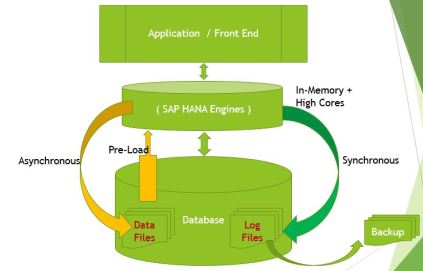
While starting the HANA DB, Data pre -loads will happen ( Complete Row store tables & Required Column store tables based on Pre-load flag setting ). What ever transactions happens on the data in In-memory, will update the Log files synchronously where as it updates periodically to Data files asynchronously.
The point of saving changed data pages to Data files is called save point. As the save point happens asynchronously and if required data is already available in In-memory, then the disk i/o will not be a Performance concern. However for in case of partially loaded database ( complete row store tables + few required column store tables ) while loading the tables to Memory Disk I/O speed matters. The save point will happen periodically whcih can be configured , Database backup and DB Stop/ restart triggered. Save point can also be triggered manually by issuing the SQL command Alter databse Save point
Unlike multiple data files / containers for RDBMS, the data file on disk will grow till it reaches the Data file size limit currently it is 2 TB. Once the limit is reached , HANA will create another file in the same disk. Otherwise the data file will grow till disk is full.
The log files update will happen synchronously on each commit, log files I/O performance have direct implication on HANA DB performance while making data changes. So, It is recommended to use high speed drives such as SSD, Fusion I/O drives.
It is recommended to have the log files backup at any point of time. In case of crash all the transactions on top of last save point will be replayed to bring the database to a last committed change.
Please note , the changes are committed in HANA In-Memory only when the changes are updated to log files successfully. Also do not delete the log files at OS level when log volume is full.
 saphana.tech.com